Edit project
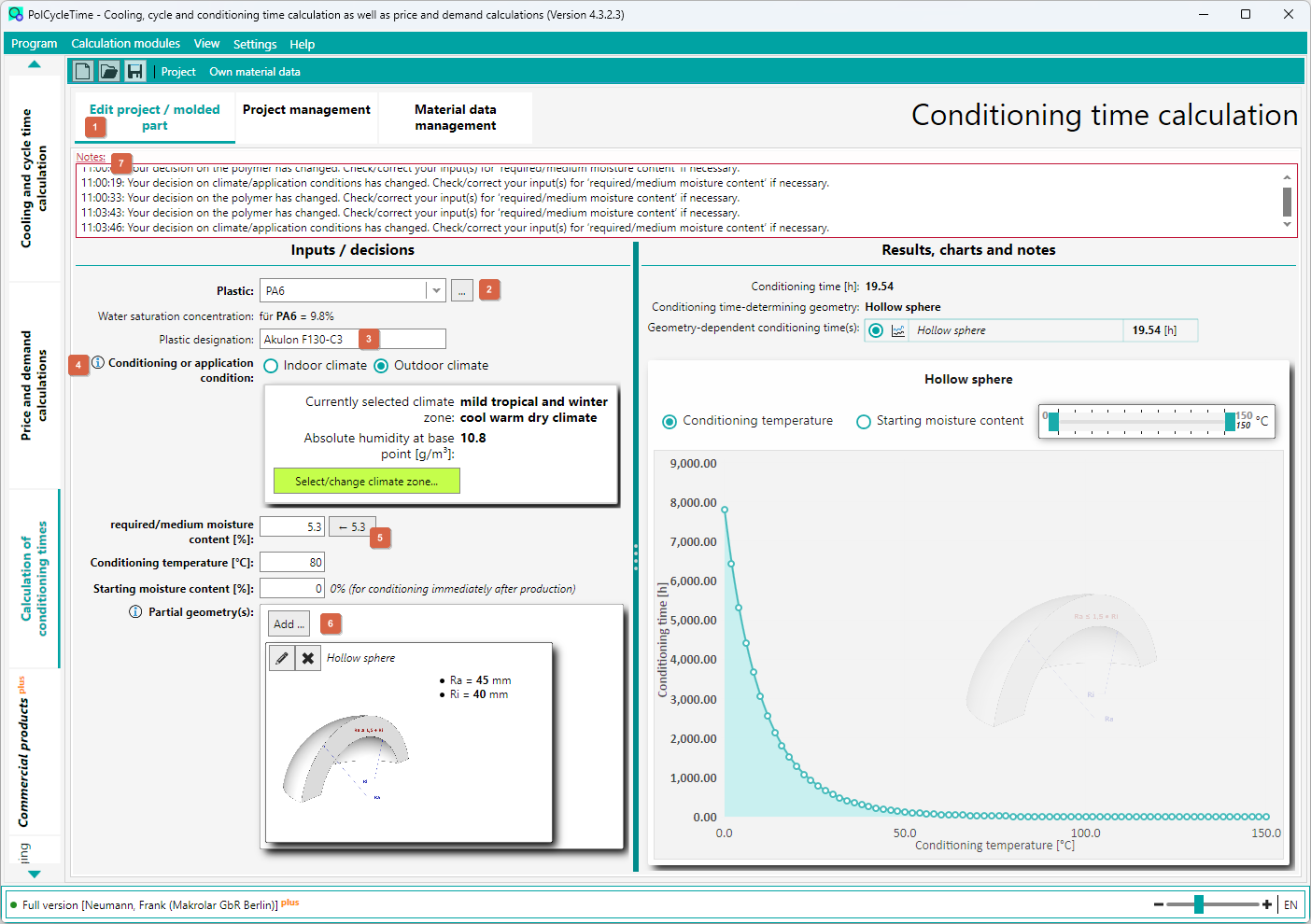
Switch to the Project/Part tab ( 1 ) to edit.
Please first read the quick start information.
- A plastic can be selected either via the selection box or through a material selection window ( 2 ).
- The plastic designation is optional and serves only for better documentation ( 3 ).
- For conditioning or application conditions you can choose between indoor climate and outdoor climate ( 4 ). In the case of outdoor climate, an additional window appears where you must select the climate zone by mouse click.
- Once you have decided on conditioning or application conditions, a calculated reference value ( 5 ) for the desired/average water content is displayed. You can adopt this by clicking the button or use your own value.
- Enter the values for conditioning temperature and initial water content.
- Add the relevant partial geometries ( 6 ).
On the right side of the tab, the results (as far as possible) or notes on missing or incorrect inputs are displayed.
In the (higher-level) register, additional notes ( 7 ) are displayed if you subsequently change inputs.