Measurements input
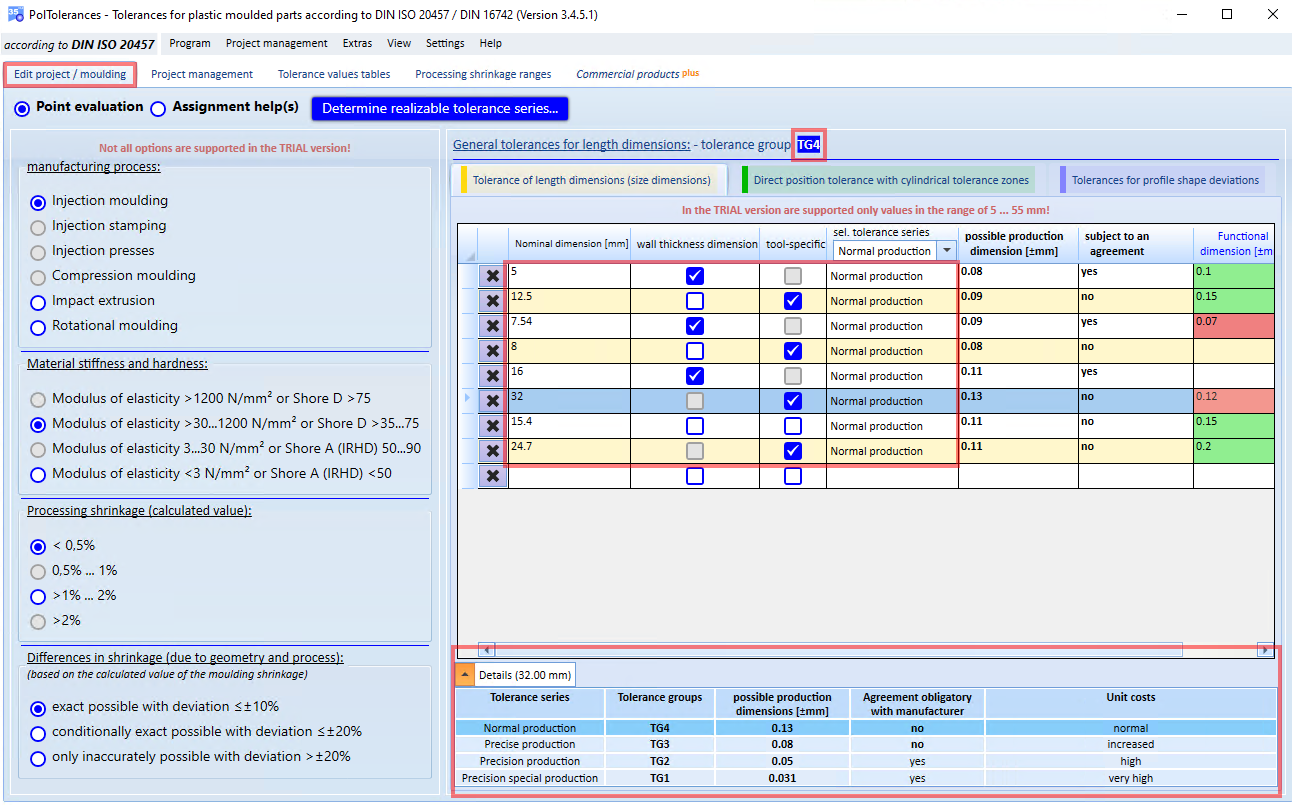
- select the corresponding tab (here: Tolerance of length dimensions).
- Enter the corresponding dimension in the first column
- if necessary, enter additional data for the respective dimension (here in columns 2-4)
- the tolerance series can be specified superordinately for all dimensions by selecting it in the selection box of the column heading
- as soon as also all inputs/decisions for the evaluation method (point evaluation and/or assignment help(s)) are available, the results per measurement are immediately displayed/updated (here: in the columns possible functional dimension and subject to agreement)
- If you have also entered information on the functional dimension, the possible production dimension is compared with the functional dimension. If the required functional dimension is greater than or equal to the possible production dimension, the corresponding cell in the table is highlighted in green (otherwise it is highlighted in red).
If you select an entry in the table, further details about this dimension are displayed below the table.
Please note that in the TRIAL version only dimensions in a restricted value range can be entered.