Quick start
- After starting PolCycleTime, switch to the Price and demand calculations tab.
- In the tab select new empty project (with variants wizard)
- Then you must first specify where the new project (the project file) should be saved
- Now you will be navigated through the individual inputs/decisions one after the other (wizard pages). Note: You can also "leave open" the following inputs/decisions and then edit them later. The sequence of the inputs/decisions also leads, among other things, to the fact that corresponding orientation values are calculated at the corresponding points and offered for selection/acceptance. If corresponding inputs are missing, no orientation values may be displayed.
- Page 1: enter a designation for the first variant and select the background color (this is for a better overview if you want to edit more than one variant in a project)
- Page 2: enter the inputs/decisions for production method and production precision
- Page 3: enter the inputs/decisions on quantities and scrap
- Page 4: enter the inputs/decisions for machine running time and cycle time
- Page 5: enter the inputs/decisions for mold, cavity numbers and mold costs
- Page 6: enter the inputs/decisions on wear
- last, a note appears that the inputs/decisions for production, material and QA costs are not entered within the wizard. You can then edit this data.
- The variant is now added to the project and the project window opens. Your inputs as well as the results (if already possible) are displayed
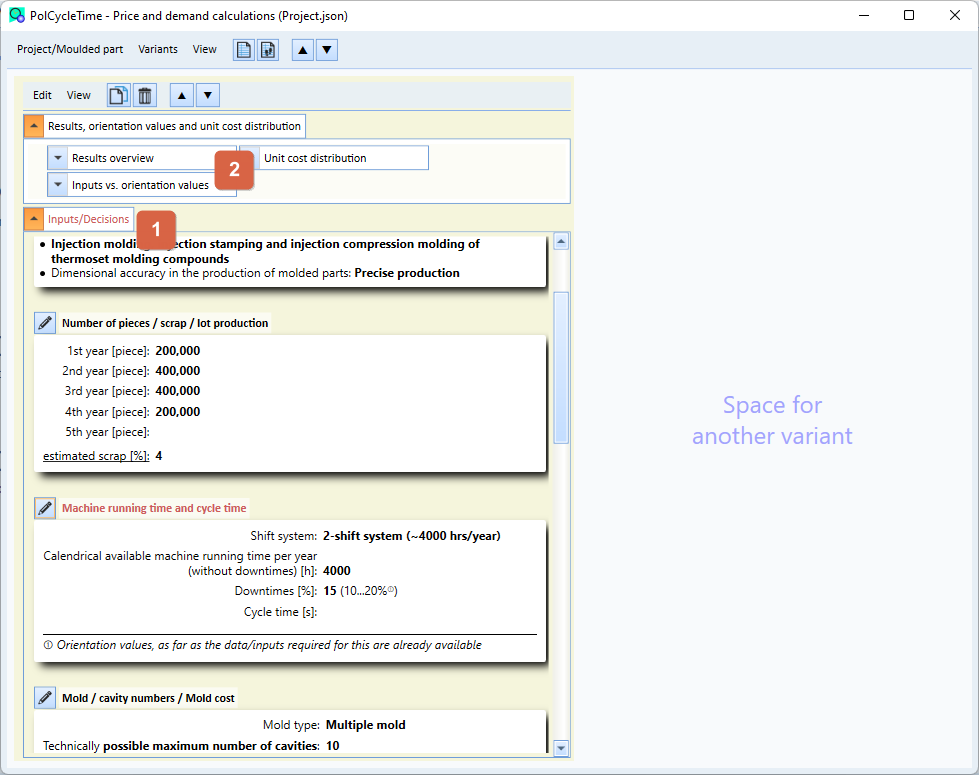
- If necessary, edit the inputs and decisions that are still open. Text 1 is marked in red as long as inputs are still missing or incorrect.
In the area 2 the results are to be seen these can be shown/hidden individually or together.
Further information can also be found on our homepage.