Edit
After selecting a plastic entry and clicking the Edit or New button, the following window opens.
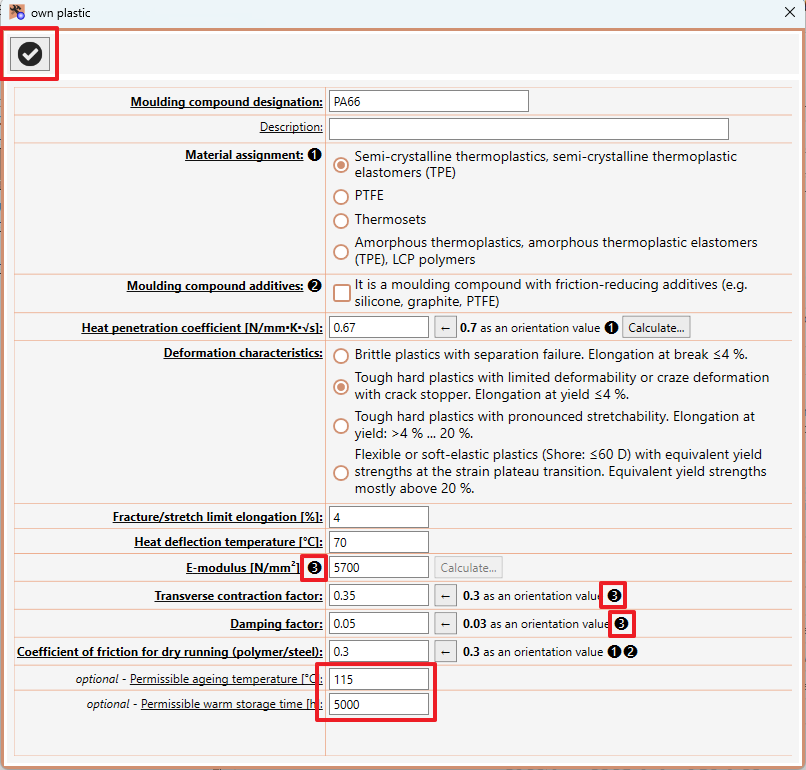
If it is an existing plastic, the previous data is displayed and can be changed. In the case of a new plastic, all inputs are usually "empty".
For certain inputs, orientation values are determined and displayed. The orientation values may depend on other inputs/decisions. These dependencies are indicated by corresponding numerical symbols. Here, for example, ❸ means that the orientation value for the transverse contraction factor and for the damping factor is dependent on the E-modulus.
As soon as all required inputs are correct and complete, the button (top left) is activated and the plastic can be accepted. If it is a new plastic, the file dialogue for saving the plastic in a file is opened.
The values for permissible ageing temperature and permissible warm storage time are optional and are needed to calculate the permissible tooth flank temperature.
To determine the values for permissible ageing temperature and permissible warm storage time, you can use our PolSelec software, for example.